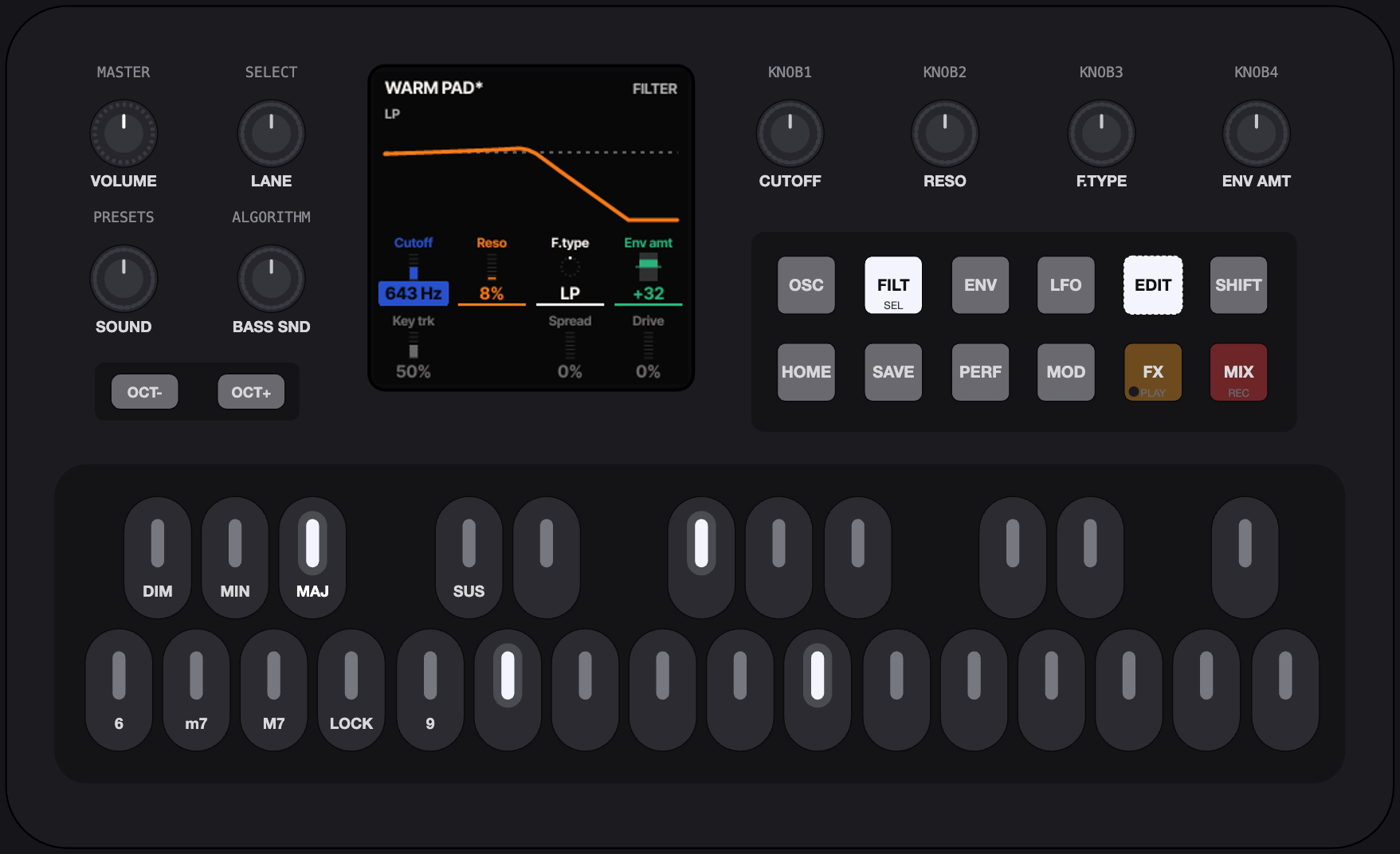
The FM-1 emulator: the real firmware, its 240 × 240 screen, the FM-1's buttons, knobs and 27 keys, its 144 sounds. Chord set 1 is on; pick another under the panel.
Not tested on real hardware
This J-6 modification was written by an AI (Claude, by Anthropic) at the request of the repository owner. Only automated tests and the in-browser emulator have checked it: it has never run on an actual M-VAVE FM-1. Installing it is entirely at your own risk; nobody is responsible for a damaged or bricked device or lost data. The browser player and the emulator below install nothing and are safe to try.
Не проверено на реальном железе. Модификацию написал ИИ (Claude). Устанавливая прошивку, вы действуете на свой страх и риск. Браузерный плеер и эмулятор ничего не устанавливают.
100 chord sets
Each set gives the 12 keys a chord someone already voiced for a style: extensions, slash basses, voice-leading. Pop, Jazz, Neo Soul, Gospel, Lofi, Funk, House, Techno, Synthwave, EDM, Cinematic, Bossa Nova, Classical and more. One key, one finished chord.
On the FM-1
Options (OPT, printed GLO) > Chord Set, the last entry: 1 to 100 (Off: ChoralRoot's own chord keys). With a set on, the right 18 keys play its chords: D4 … C#5 the 12 chords as listed, D5 … G5 an octave up. The left nine keys become the set's controls, like the J-6's panel:
| Key | Job |
|---|---|
| F3 / G3 | SET − / SET + |
| F#3 / G#3 | GENRE − / GENRE + (the first set of the genre) |
| A3 / A#3 | TRANSPOSE − / + (−12 … +12) |
| B3 | HOLD: the chord keeps sounding (LATCH) |
| C4 | PHRASE on / off (strum, arpeggio, pattern) |
| C#4 | next PHRASE: Strum, Strum 2 Oct, Slop, Arp, Arp 2 Oct, Pattern, Harp |
KNOB 1 voices the chord, BASS plays the voicing's lowest note (a slash chord's bass), OCT− / OCT+ shift by octaves, PRESETS picks one of 144 sounds (OPT + PRESETS: the engine). The set is kept over a power-off.
The sets follow the chord names and notes of the "Chord Set List" in the Roland J-6 owner's manual, used as a reference and an inspiration: chords and progressions are common musical material. No Roland code, firmware, samples, sounds or artwork are included; the engines and the code are this project's own (GPL-3.0). Not affiliated with, endorsed or sponsored by Roland Corporation. Roland, AIRA and J-6 are trademarks of Roland Corporation.
Melodic Exploration, Not a Groovebox
One hand plays root notes while the other shapes the chords. The screen shows one thing at a time, BIG.

Get it
Try it first
The exact same firmware, running in your browser. No FM-1 needed. Chrome, Edge and Firefox supported.
The installer talks to the FM-1 over Web MIDI. The firmware it runs now (stock, Felucca, Melodee or ChoralRoot) stages the update loader, the loader writes the whole image, then the FM-1 restarts and reports FM-1_920. An update saves a backup first and keeps your settings, sounds and loops. Charge the FM-1 fully first: it writes on its battery, and the installer cannot read its charge. Plug it straight into the computer (no hub), keep the computer awake and leave the cable alone until the installer says Done. If an update is cut off anyway, Recovery has the way back.
On the command line, from the source: pip3 install mido python-rtmidi, then python3 tools/fm1_install.py choralroot-0.21-j6.fwsc. --info prints the connected FM-1's identity.
Playing
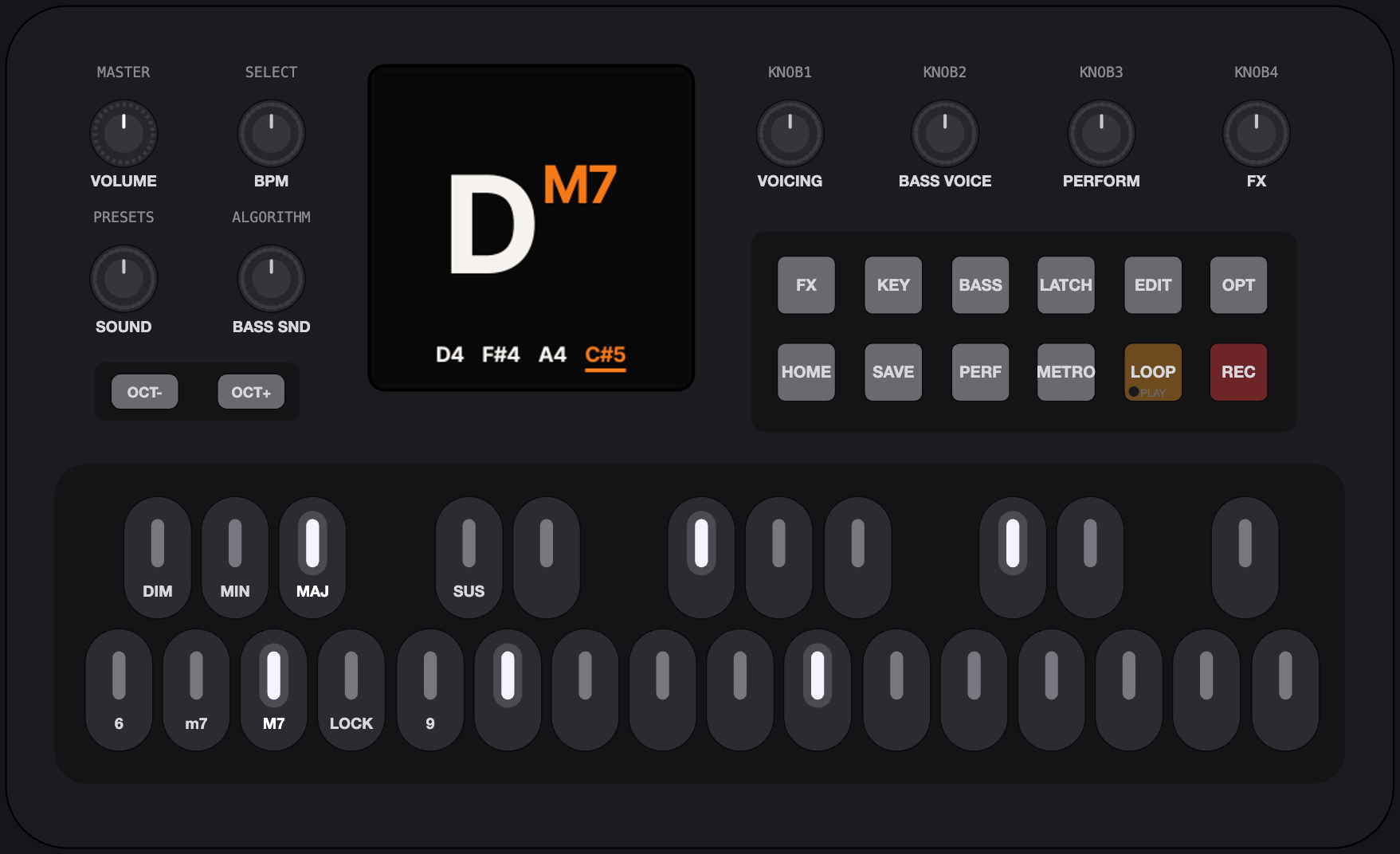
The left side of the keyboard is your chord command center. Use the top row to control a chord type and the bottom row to add modifiers like 7ths and 9ths. Key B will lock your chord commands. Play a root note on the right and let ChoralRoot handle the rest. We promise, you're in good company.
The chord block, F3 … C4
The roots, D4 … G5. OCT− / OCT+ shift them by octaves, −2 … +2.
Chord types on the black keys F#3 G#3 A#3 C#4: DIM, MIN, MAJ, SUS. Extensions on the white keys F3 G3 A3 C4: 6, m7, M7, 9. Both are momentary; extensions stack.
Roots on D4 … G5, 18 keys: alone a single note (in Key Mode, the chord the scale puts there), with a type held (or latched) the chord. OCT− and OCT+ shift them by octaves, −2 … +2.
LOCK
B3 is LOCK (held: the LOCK layer, two settings for how it latches: a type key clears or keeps the latched extensions; the extension keys toggle or are pushed as a set). Tap it on (B3 lit, lock top right on the screen), tap it again off. With LOCK on, the chord keys held are latched when released, so one hand plays roots. Once nothing is held, a type key resets the latch to that type alone, and an extension key toggles its extension in the latched set.
Hold MIN, release: minor. 6: m6. 9: m6/9. 9 again: m6. MAJ: major, extensions cleared.
Two types held together make a Secret Chord (Options > Secret Chords, off by default): DIM+SUS a power chord, MAJ+SUS augmented, MIN+SUS [0 3 5].
Buttons
Tap = use, hold = open, OCT−, HOME or the same hold again = close.
A tap is the button's on/off action, always. A hold past 0.4 s (Options > Hold Time) opens its layer, and the layer stays open after release (the button blinks); holding another layer button switches layer. A layer is a picker over a row of four cells: KNOB 1–4, in the knob colours, each with a small picture of its value. The chord keys keep their job (in the KEY layer MAJ and MIN pick the scale instead).
| Printed | ChoralRoot | Tap | Hold |
|---|---|---|---|
| SEL | KEY | Key Mode on/off | the KEY layer: a root = the tonic; MAJ / MIN = the scale (their lights show it); KNOB 1–4 = Tonic / Scale / Transpose / Single; SELECT = page 2 (Key plays, Keyboard); GLO = the keys pick the key / play |
| ARP | PERF | the performance mode on/off | the PERF layer: SELECT = the mode (Strum, Strum 2 Octaves, Slop, Arpeggiate, Arp 2 Octaves, Pattern, Harp); KNOB 1–4 = its parameters; the roots play; a tap is still on/off |
| FX | FX | the effects on/off | the FX layer: SELECT = the page (Reverb 1, Reverb 2, Chorus, Delay 1, Delay 2, Drive); KNOB 1–4 = its cells, KNOB 4 on a first page = the chord sound's send; the effects' settings are the instrument's, a sound carries only its sends; the roots play; a tap is still on/off |
| ENV | BASS | bass on/off (it comes back as you left it) | the BASS layer: SELECT or KNOB 1 = Behaviour (Chords Only / Unison Bass / Bass Single Notes / Solo); KNOB 2–4 = Register / Sound / Level. BASS held + EDIT = the bass sound's editor |
| LFO | LATCH | latch on/off: notes sound on until the next ones; it keeps an arpeggio running | — |
| GLO | OPT | the Options open/close | held + a knob = the knob's second job: PRESETS the chord sound's engine, ALGORITHM bass level, KNOB 1 split point, SELECT metronome level. In the editor: SHIFT |
| HOME | HOME | back to the view from anywhere; on the view: the next view (Chord / Keyboard / Notes / Geek Out / Scope) | 0.6 s: the view menu: SELECT = the view, KNOB 1 = Lock |
| SAVE | SAVE | the save dialog: Overwrite, or Save as new, named with the keys | while held: save / load / delete a loop slot |
| SEQ | METRO | metronome on/off | the METRO layer: SELECT = the time signature (4/4, 3/4, 6/8); KNOB 1 = the click's level |
| PLAY | LOOP | play / stop the loop (green light = it plays); while recording: ends the take | the PLAY menu: PRESETS = the slot, 1–10; ALGORITHM = the record mode; SELECT = the length; KNOB 1–4 = Quantize / Count-in / Level / Keys |
| REC | REC | record, the way the record mode says; again: ends the take. The REC light blinks while recording | undo the last layer |
| EDIT | EDIT | the sound editor on the chord sound | the engine picker |
| OCT− / OCT+ | OCTAVE | the octave of the roots; in layers, menus and dialogs: back (closes) / confirm (closes too where there is nothing to confirm) | both together: PANIC (every note off, on MIDI too; the octave back to 0, the LOCK latch cleared, LATCH off, the loop stopped) |
Rotaries
No push switches. A turn of any knob but MASTER shows its value big for a second.
| Printed | ChoralRoot | Turn | OPT held |
|---|---|---|---|
| MASTER | VOLUME | the volume (the pot) | — |
| SELECT | BPM | the tempo, 20–300; in a layer or a menu: its picker | metronome level |
| PRESETS | SOUND | the chord sound: the next or previous one of its engine; it loads at once | the chord sound's engine |
| ALGORITHM | BASS SOUND | the bass sound: off, then the sounds of the bass's engine | bass level |
| KNOB 1 | VOICING | the Orchid's chord voicing: the lowest note up an octave, or the highest down; one click = one note. Never reassigned outside layers and the editor | single-note split point |
| KNOB 2 | BASS VOICE | the bass register, in octaves | — |
| KNOB 3 | PERFORM | the performance mode's first parameter: strum rate, slop amount, arp division, pattern, harp rate | — |
| KNOB 4 | FX | the chord sound's send into the selected effect (a turn switches the effects on) | — |
The looper
It records chords, not audio, so a playing loop follows the sound you choose now, the voicing on KNOB 1, the performance mode and the bass. On a new FM-1, tap REC and play: the first chord starts the take, REC or LOOP ends it, and the loop plays at once. The PLAY menu (LOOP held) has ten slots, five record modes (Overwrite, Advance, Overdub, Replace, Step) and the length of the next take: Free, or 1, 2, 4, 8 or 16 bars after a count-in. A slot keeps its loop: it is saved when the loop stops, and is still there after switching off. The looper in the manual.
Options
OPT tap opens them, one setting per screen. SELECT steps through the settings, KNOB 1 sets the value, and OPT, HOME or OCT− leaves. Play Style (Simple / Advanced / Free), Extension Addition, Secret Chords, Velocity, Bass Behaviour, Single Notes, Split Point, the MIDI Perform / Bass / Raw Chord channels, Raw Chord Sound, MIDI Clock, View, Motion, LEDs, Hold Time, USB Record, USB Level, Dual Core, Version, Calibrate. The manual says what each one does.
Dual Core is Off by default in 0.16: one core, as the stock firmware runs. On (after a restart) gives the bass the chip's second core and its own voices; it is the first thing to turn off if an FM-1 ever crashes or resets while playing.
Screen
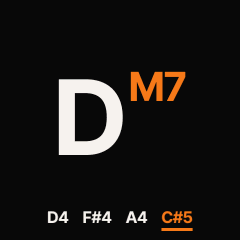
The chord name fills the screen (the Orchid's naming, squeezed to fit), the voiced notes under it, extensions in orange; Key: C top left in Key Mode. Five views: Chord, Keyboard, Notes, Geek Out, Scope. HOME on the view steps to the next; HOME held opens the view menu, where Lock keeps a HOME tap from changing it. Pickers instead of lists, meters of bold stripes, a recording or playing loop as a small red dial at the right of the top line. Panic turns the screen red.
The sound editor
EDIT tap opens it on the chord sound, BASS held + EDIT on the bass sound; inside, SHIFT + EDIT switches between them. EDIT tap or HOME leaves. Every group remembers its screen and lane.
Groups
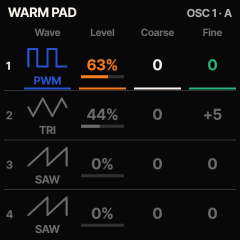
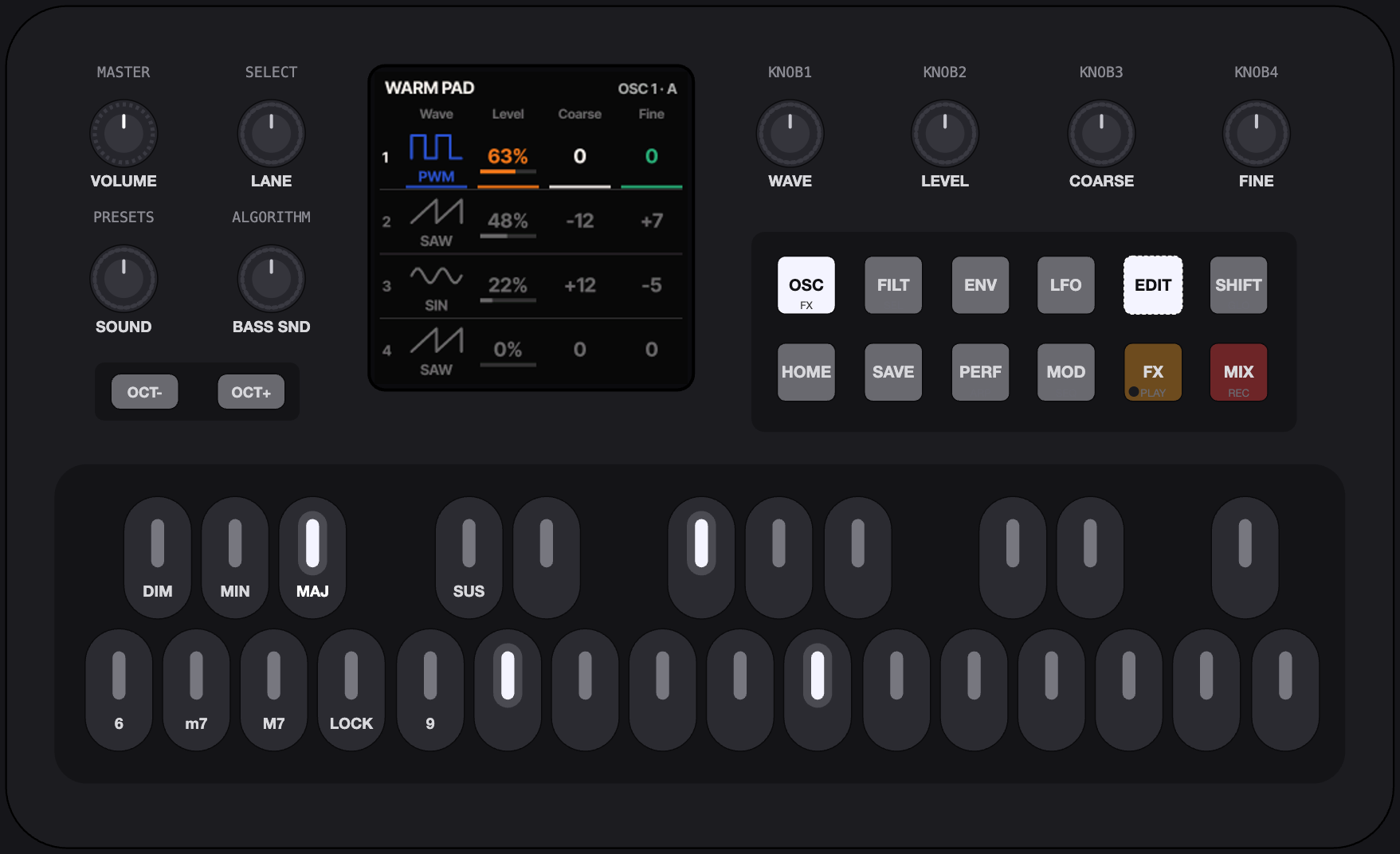
The buttons become seven groups. The top row is the signal flow (OSC on the printed FX, FILT on SEL, ENV, LFO), the bottom row the output stage (MOD on SEQ, FX on PLAY, MIX on REC). A group's button opens the group; tapped again, its next screen. Every engine fills the same groups with its own screens; the manual lists them engine by engine.
Lanes
SELECT runs through the lanes, and on into the group's next screen. A lane is the four values on KNOB 1–4, always in the same four colours.
KNOB 1
KNOB 2
KNOB 3
KNOB 4
A detent is about 5 % of the range, or one step of a list. SHIFT (GLO: a tap latches it, a hold is momentary) makes it one unit a detent.
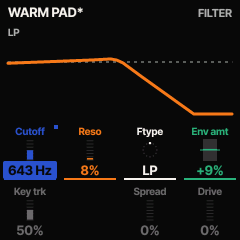
The engine picker
EDIT held, or PRESETS turned in the editor, opens it as a preview. The white roots are the engines: FM6, FM TONE, VA, CZ-1, WHEEL and PHYS; SELECT steps through them too. KNOB 1 turns through the engine's presets, KNOB 2 inits the sound, KNOB 4 gives the roots back to playing, to hear it. OCT+ or EDIT keeps it; OCT− or HOME cancels, and the sound comes back.
Quick mapping
For an engine with a matrix (the VA): ENV held + a knob turned, and the envelope last shown modulates that knob's parameter, the amount on the knob. LFO held + a knob does the same with the LFO. OCT− held + a knob clears the parameter's modulation. A modulated cell carries a small mark in the source's colour.
SAVE
SAVE opens the save dialog: Overwrite or Save as new, on KNOB 1 or SELECT. SAVE again or OCT+ takes the choice, OCT− cancels. Overwrite saves at once under the same name, over a factory preset too. Save as new adds the sound at the end of its engine's presets and asks for a name: the white roots type it, D#4 is a space, F#4 deletes. SAVE held 1 s in the dialog offers to delete a sound of yours, or to reset a factory preset you saved over. There is room for 32 saved sounds in all, chord and bass together.
Sounds
Two sounds at once: the chord sound on PRESETS, the bass sound on ALGORITHM. Each belongs to one of six engines, and every engine keeps one pool of presets.
FM6's pool PRESETS 01–25
- TINE EP
- FM BELL
- FM BASS
- BRASS
- FM PAD
- MARIMBA
- FM ORGAN
- FM PLUCK
- DX TINE
- BRASS SECT
- SOLID BASS
- BELLS
- DX MARIMBA
- CLAVINET
- DRAWBARS
- STRINGS
- GLASS PAD
- SYNC LEAD
- HARP
- KALIMBA
- FLUTE
- STEEL DRUM
- SAW BASS
- TUBULAR
- PIANO
Where a new FM-1 starts: FM6, TINE EP.
A pool is 00 INIT (the engine's plain starting sound), then its factory presets, then the sounds you saved into it. PRESETS turns through the pool of the chord sound's engine and wraps round; the screen reads FM6 · 02/25, the place and the number of presets (INIT is not counted). OPT held + PRESETS turns through the engines, and you land on the sound you last used there. ALGORITHM does the same for the bass, with 00 off in front: on a new FM-1 the bass is the VA's DEEP SUB.
Engines OPT + PRESETS
- FM6 · 25
- FM TONE · 16
- VA · 25
- CZ-1 · 64
- WHEEL · 5
- PHYS · 9
Each with its number of factory presets.
All synthesis: Felucca's WHEEL (tonewheel organ) and PHYS (modal and string physical models); Melodee's FM6 (six-operator FM that plays DX7 voices) and CZ-1 (Casio's phase distortion, with its 64 tones); and ChoralRoot's VA and FM TONE (four-operator FM). No samples: the firmware leaves out Felucca's SAMPLE, GRAIN and DRUM engines, and since 0.14 its ANALOG. The VA replaces it, and a sound saved on ANALOG loads on the VA.
The VA
ChoralRoot's own four-oscillator virtual analog, written for this project in fixed point: four oscillators (basic waves, a morphing wave from sine to pulse, or white / brown / vinyl noise), a state-variable filter that morphs LP → BP → HP → notch with spread and drive, four AHDSR envelopes, four LFOs (free or synced to the tempo) and an eight-slot modulation matrix, in stereo. Every parameter is on the editor's screens, and a patch saves with the sound.
MIDI
USB MIDI in and out, TRS MIDI in. Over the same USB cable the computer records the FM-1.
Out
Three streams over USB, each with its channel in Options: Perform (the chord as played or performed) on channel 1, Bass on channel 2, and Raw Chord (the plain chord), Off by default: give it a channel of its own (the Orchid uses 3). MIDI clock goes out too (Options > MIDI Clock: Out, the default), with start and stop as the loop starts and stops.
In
Notes on the Perform channel play the chord sound directly, with no chord generation, as on the Orchid; notes on the Bass channel play the bass sound. CC 7 is the part's level, CC 91 / 93 / 94 its reverb / chorus / delay amounts; program change picks the place in the engine's pool. With MIDI Clock: In, the tempo follows the clock and the loop follows start, continue and stop. SysEx carries updates, backups, the device manager, and DX7 voices and Casio tones into FM6 and CZ-1 sounds.
USB recording
The computer sees an audio input, ChoralRoot In: class compliant, no driver, six channels at 44.1 kHz. Channels 1–2 are the master (what you hear, without the metronome click), 3–4 the chord sound alone and 5–6 the bass sound alone, both before the reverb, chorus and delay. The computer cannot play audio through the FM-1, and there is no Bluetooth MIDI. MIDI and USB in the manual.
Recovery
From 0.16 on, ChoralRoot checks at every start that its firmware was written completely. The installer's Return to official V15 puts M-VAVE's firmware back.
If an update is interrupted (the cable, the battery, the computer going to sleep): switch the FM-1 off and on again. Some of the key lights flash three short times and the screen stays black: the FM-1 is in update mode. Open the installer and press Install again; it finishes the write. If only the computer side stopped while the FM-1 stayed on, it is still in update mode: replug the cable and press Install again. The update to 0.16 from an older version is the last one without this protection during its first second.
Update mode on purpose: hold OCT− alone while switching on. Three short flashes and a black screen: open the installer and Install, or switch off and on to start ChoralRoot again (nothing was written). The gesture is new in 0.16; recovery after an interrupted update does not depend on the key.
If the FM-1 stays dark (a black screen with a disk named WL82 UBOOT1.00 on the computer, or nothing on USB at all): do not format the disk. Follow "If the FM-1 no longer starts" in the README and the checklist in INSTALL-COMPAT.md, which lead to MvaveFM1Unbricker.
Back to the stock firmware: download the official FM-1 V15 firmware (FM-1.fwsc) yourself from M-VAVE's downloads page and select it in the installer. The browser checks its size and SHA-256 locally (the file is never uploaded), saves a backup first and installs it the same way. On the command line: python3 tools/fm1_install.py FM-1.fwsc.
Back up on the installer page saves everything stored on the FM-1 (the settings, the 32 saved sounds with their patches, the ten loops, the FM6 voice bank and the CZ-1 banks) to one .json file, and Restore writes it back. Single sounds travel as files from its Sounds section, or with the device manager.
SAFE MODE, the panel calibration and one long flash instead of three: Updating and recovery in the manual.
Credits and licence
ChoralRoot was made by Quixotic7 with the assistance of his AI Overlords: Claude Fable 5.1 and Claude Opus 5.5. ChoralRoot is free, don't like something, feel free to make your own version. ChoralRoot FM-1 is free software under the GNU General Public License, version 3 only: LICENSE. The package and this site carry LICENSING.md and the licence texts in LICENSES.
The J-6 fork (the 100 chord sets, the SET block, the browser chord player) was written by Claude (Anthropic) for EremanSim, and has not been tested on hardware.
- Felucca by Leo Kuroshita (@kurogedelic), Hügelton Instruments: the platform, the engines, the installer, the update loader; with its CrispyZebra waveforms (the PHASE engine) and its Fukiai icons (MIT). github.com/hugelton/Felucca
- Melodee by Kerem Kilic (Ellic Studio), GPL-3.0: the FM6 engine as it plays here (DX7 voices as Dexed renders them), the CZ-1 engine, the USB audio recording, and the work that makes the second core robust. github.com/keremimo/melodee
- The chord logic is inspired after the Telepathic Instruments Orchid ORC—1 and Quixotic7's prior monome grid iii adaption choralroot.
- Inter Tight by The Inter Project Authors (SIL OFL 1.1, OFL.txt): the UI font, and this page's.
- DaisySP (Electrosmith, Emilie Gillet) and Rings (Emilie Gillet), MIT: the PHYS engine.
- msfa (Google, Apache-2.0) and Dexed (Pascal Gauthier, GPL-3.0-or-later): the FM6 engine's synthesis. The MAME uPD933 model by Devin Acker (BSD-3-Clause): the CZ-1's. fm1-x0x (GPL-3.0): the second core's bring-up.
- JieLi AC79 SDK: the package holds three of its files (uboot.boot, cfg_tool.bin, eq_cfg_hw.bin; JieLi Technology, Apache-2.0). No M-VAVE material.